Showing posts with label facebook. Show all posts

Saturday, September 14, 2013

Facebook Force Converting Accounts Into Fan Pages - PLAYERS STAY INFORMED (REPOST)


Well, something is really going on. Just to avoid not to inform all of you about changes Facebook is doing lately (if that is what we could call that), this way we thank Mafia Wars Loot Lady for pointing it out.

Here is repost of Mafia Wars Loot Lady post, titled: 

It’s bad enough we worry about losing our Facebook accounts to security checks, hackers and reporting campaigns but now there is another reason to be concerned.  Something very scary is happening to many gamers.  If deemed appropriate, Facebook is force converting personal accounts into fan pages. On the surface this doesn’t sound like the worse thing in the world but a fan page is missing a key element of a personal page...the ability to use applications. For those who don’t know, all games are applications and if your account is converted you lose access to your gaming account(s). At this time I won’t name or link the accounts that have been affected because drawing more attention to them may not be in their best interest. If this has happened to any of your friends, unlike the page immediately.  There isn’t much information out there and most of it can be found in the Facebook Help Center. Facebook limits the number of friends you can have to 5,000 and if this is a factor Facebook uses in determining that you should be a fan page, most of us are at risk. One theory is that when you reach a certain threshold of followers, Facebook flags your account. I don’t know if this is true or not but I’m not taking any chances and neither should you. I suggest all gamers turn off the option to allow followers (instructions are shown below). If your account was converted into a fan page, you need to submit a request for a reversal by going here. Many claim that Zynga reads this site and often uses it to fix glitches. If any of that is true and Zynga is reading this the take home message should be that something needs to be done. Not only are you losing players to Facebooks stupidity, the players you have left are now living in fear and may not be so willing to purchase all those deals in the Marketplace. A support document should be created so affected players can reach out and get their accounts back. 


fan1fan6
From what I’ve read Facebook is cracking down on people who use their personal accounts to promote their businesses. Unfortunately gamers are stuck in the middle. Facebook doesn’t seem to be giving people the option if they feel that you are using your account to represent something other than yourself. Affected players were not given the option to convert their accounts, they were told they needed to do so. As stated at the end of this answer if they don’t convert than you risk permanently losing access to your account and all of it’s content [1].
fan7
To decrease your odds of getting flagged, it’s suggested you stop allowing followers. To turn off the option, go to your account dropdown menu and choose account settings. From there click on the ‘Followers’ link in the left column and uncheck the ‘Turn On Follow’ box. 
fan3fan4fan5

credits for the post goes to Mafia Wars Loot Lady

Saturday, January 26, 2013

What Is Facebook Graph Search, and Why Should I Pay Attention?


What Is Facebook Graph Search, and Why Should I Pay Attention?


Earlier this week, Facebook unveiled their new Graph Search functionality, a new way to browse information on Facebook. While we predicted Facebook would move heavily into Search as a way to add additional revenue streams, up to $2 billion a year in additional advertising spend, we couldn’t anticipate exactly how the new search engine would work.
Now that it’s launched, Facebook’s search engine is beautiful in its simplicity. Unlike Google Search, which is designed to provide links to where you can find the answers to your query, Facebook Search is designed to provide the answer to your query. See the difference? On Facebook, you can search for things like “Who do I know in Chicago?” or perhaps “What are some Italian restaurants in Chicago?” With queries like this, Facebook can return results utilizing their massive social graph technology to show the things that are connected to your social circle.
Graph Search promises to be a large boon for both small and large businesses, as the sheer amount of traffic on Facebook means that if only 10% adopt the Search technology in the first year, that could amount to trillions of connections. Think about it this way: now, your Facebook page is more than just your presence with which you can connect to users, it now doubles as a branded search engine result.
What should you do for now? Continue to engage your customers by growing the number of likes that you have as well as by purchasing sponsored stories. As Graph Search takes off, there will be plenty of opportunities to move part of your search advertising budget into Facebook Search and reach over a billion people by a trifecta of personalization: demographics, context and intent, and customer connections.

originally posted: intechnic

Sunday, January 6, 2013

‘Facebook Dead’: How Anybody Can ‘Kill’ Their Friends


‘Facebook Dead’: How Anybody Can ‘Kill’ Their Friends


ht facebook rusty foster jt 130106 wblog Facebook Dead: How Anybody Can Kill Their Friends
                                                                                                               (Image Credit: Facebook)
Rusty Foster discovered he was dead last week, at least according to Facebook. He had been locked out of his account, which had been turned into a “memorial page,” because someone had reported the Maine man as deceased to the social media site.
He tweeted Thursday, “Facebook thinks I’m dead. I’m tempted to just let it,” then “Did you know that you can report any of your Facebook friends dead & Facebook will lock them out of their account with no evidence needed?”
As one of Foster’s friends discovered, it doesn’t take much to convince Facebook that somebody is dead. By simply going to the “Memorialization Request” page and filling out a form, including a link to an obituary, anybody can take someone else off Facebook.
ht facebook memorialization page jt 130105 wblog Facebook Dead: How Anybody Can Kill Their Friends
                                                                                                               (Image Credit: Facebook)
The obituary needs to have the same name (or at least a close name), but doesn’t need to match any other details on the profile. The obituary Foster’s friend used to prove Foster’s death was for a man who was born in 1924 and died in 2011 in a different state than the one Foster lists on Facebook as his home state.
Foster, 36, said he never got any notification his account was going to be locked, and only discovered it when he attempted to log in. He filled out a form to report the error, and received a response that began with “We are very sorry to hear about your loss.”
More than a full day later, Foster’s account still hadn’t been unlocked. Buzzfeed, tipped off by Foster, posted an article in which one editor “killed” another editor, John Herrman, on Facebook. According to the article, about an hour after Herrman reported the error to Facebook, his profile was reactivated. About an hour after that, 27 hours after Foster first reported his erroneous death, he was “resurrected” by Facebook and allowed back into his account.
Foster does not know the total amount of time he was “Facebook dead.” He told ABC that nothing was different with his account when he logged back in, only that some of his friends had a little fun with his status.
“The only thing that happened was some of my friends posted little mock-eulogies for me, because word got around that I was locked out, due to a temporary case of death,” Foster wrote in an email with the subject line, “Rusty, the Facebook zombie.”
When pages are memorialized, they are removed from sidebars, timelines and friend suggestions and searches. This is likely to prevent people from seeing their friends who have died pop up on their newsfeed, and to prevent people from hacking into the accounts of dead people.
Foster said he understands the position Facebook is in when it comes to the death of one of its users, but believes there are better options for the social media site.
“There ought to be an email sent to the account’s email address informing it that the account has been reported dead and providing a link or something to dispute the report before any action is taken,” Foster wrote.
Foster said the most frustrating part was not being able to get into his account to “click the ‘I’m not dead’ button that should also be there.”
This has apparently been the same “memorialization” process since at least 2009, when another user took to his personal blog to write about his experience of being “Facebook dead.” In his case, the obituary his friend used to have him declared dead wasn’t even close to his real name. Instead, the man who performed the funeral services had a similar name.
In a statement to ABC News, Facebook said the system is in place in order to respect the privacy of the deceased.
“We have designed the memorialization process to be effective for grieving families and friends, while still providing precautions to protect against either erroneous or malicious efforts to memorialize the account of someone who is not deceased,” the statement reads. “We also provide an appeals process for the rare instances in which  accounts  are mistakenly reported or inadvertently memorialized.”
reprinted from: abcnews

Friday, August 10, 2012

How to post feeds on Timeline

for every popup in the game
put: sign, number, letter....something and post it out
it will be posted normally, if you allow MW on Timeline


for feeds that there is no popup in the game
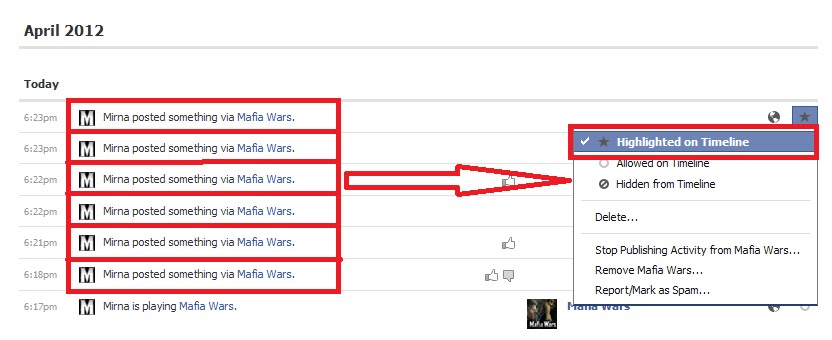
1. go on Timeline
2.open Activity log


for EVERY post from MW, in Activity log in the right corner pick option: Highlighted on Timeline

go back on Timeline.
each of those posts are now shown on your Timeline through entire row.


by clicking on star in the right corner where stands: Remove from Highlights, on each of such posts, your MW posts will look like this:


This is working for all Zynga's games not just MW!

Tuesday, August 7, 2012

THIS IS VIRUS ALERT!!!!!


If you find yourself tagged in something like this:


PLEASE follow the steps:
1. DO NOT click on Facebook Profile Viewer clickable option
2. UNTAGG yourself
3. delete it

Wednesday, August 1, 2012

Help! I can’t hide Facebook comments any more!


Facetesting Facebook deletes 6book seems to have thrown its moderators and community managers yet another unannounced curved ball, and you can't hide Facebook comments any more.  When moderating, the old 'hide' option has disappeared, both from a comment left on a wall ‘post by other’ or a comment made upon a Page post update. You may only delete it and then - immediately afterwards -  have the option to un-delete.
Interestingly though, Facebook now offers the option to ban/unban and message the user directly from the comment ... see the screengrabs below.  So this is an update to our previous post: Step by step guide to moderating comments on Facebook Timeline  Step by step guide to moderating comments on Facebook Timeline .

Once they’re gone, they’re gone
The removed posts are not showing up as the ‘little row of dots’ in the commenting either - so once they are gone, although you can choose to immediately undo your action, they leave no trace of your moderation action.
Spam ‘auto-hides’ unaffected
However, it seems that when FB decides a comment is spam and auto-hides it, we can then still view the hidden comments and unhide them again if we choose.
Why that’s a problem for us
This may not be important to some, but it is for our moderation and community management teams for two reasons:
Firstly, it’s crucial to be able to justify our each and every action to a client and reverse it if there is disagreement – which is one reason why the ‘hide’ function was so important. Now, unless our clients have opted to use a third party tool to moderate their Facebook Page (and we recommend this), moderators will have to laboriously record the content and timing of each and every user post we deem to have fallen foul of the Page terms in order to give us the audit trail and quality assurance that our reputation is built on. This severely impacts the number of comments a moderator can get through on a shift.
Secondly, the ‘hide’ function was important as when it was used, the user posting - and their friends - could still see the comment and were not aware it had been hidden.  Especially useful for crisis situations where to delete / not to delete may make all the difference to public sentiment, this gives our clients time to be consulted on whether they wanted a comments to be visible to the public or not.
Thanks for letting us know, Facebook
A quick Google search on the issue reveals no other articles on the topic at the time of writing, which confirms our feeling that this has been rolled out without any kind of announcement.  Obviously Facebook wouldn’t have listened to the concerns of community managers – when do they ever? – but some forewarning, description of, and justification for the change would have been appreciated.
Moderating comments in Facebook - it works the same from the front end of the activity log, basically.
1.  Hover above the 'x' in the top right of a comment

2. Delete the comment, and Facebook gives you further options to undo/report/ban/message user

3.  If you choose to message the user, here's the screen:
4.  Although, this function didn't seem to be working too well at the time of testing - we either got the 'report it' screen or a failure notification.
repinted from: http://socialmediatoday.com/  

Sunday, July 15, 2012

Facebook's nonsenses


This is what you can find when you type Facebook in Google:

"Facebook is a social utility that connects people with friends and others who work, study and live around them. People use Facebook to keep up with friends, ..."

I am asking my self:

1. Why would i use facebook to contact, talk, play....or whatever with my friends. I am talking about my real life friends. I call them usually, they call me,using skype, mobile phone, msn.... and we are not using Facebook chat for that. Or with my family? Why would i chat with my husband, son or any other family member through Facebook. My God they are in the same, or can be different house,city,state.... i am, i do not need Facebook for that, i can reach them without Facebook.

2. So at start - Facebook had an idea but if Facebook users have their own family members or real life friends among Facebook friends, not a large number of them are using Facebook to contact with them - i hope.

3. Those users who has only real life friends of family members, are usually small friends number users.

4. If that is facebook's idea at start why is upper limit 5000?

5. No, upper limit is for something else. Facebook can't live and would not be alive anymore if there are not company as Zynga is, or similar companies. That is reason for 5000 friends number limit.

6. But if that is reason for, what is the point in that famous sentence when you have friend request: "do you know this person outside facebook"?!? Or even worse - blocking users for sending friend requests to people they do not know.

7. We all know that, we were all, or all almost in phenomenal "Facebook jail".

8.Cache - it is so popular lately. It is combination of words, numbers or symbols that you need to fill in specific place, so that Facebook is sure you are not robot.

9. That is the greatest nonsense i've ever seen. On the other hand Facebook is blocking profiles (users) with lot of friends on friend list and ask them to recognize 5 friends by name of the 6 offered names (you can skip 2) based on pictures they are tagged in. You must be robot to do that, and at the same time have 1,2,3 or even 5000 friends.

10. I will not even mention asking for digital photo of original document (passport, driver licence....). With what right? You do not trust me Facebook? Why should i trust you? You are earning lot of money from me and almost 5000 my friends.

11. You are loosing users, that is not surprising me, you will lose them even more with such a policy and nonsenses.

OR

Facebook is counting on that - loosing users because they can't handle with such a number anymore.