Saturday, January 26, 2013

What Is Facebook Graph Search, and Why Should I Pay Attention?


What Is Facebook Graph Search, and Why Should I Pay Attention?


Earlier this week, Facebook unveiled their new Graph Search functionality, a new way to browse information on Facebook. While we predicted Facebook would move heavily into Search as a way to add additional revenue streams, up to $2 billion a year in additional advertising spend, we couldn’t anticipate exactly how the new search engine would work.
Now that it’s launched, Facebook’s search engine is beautiful in its simplicity. Unlike Google Search, which is designed to provide links to where you can find the answers to your query, Facebook Search is designed to provide the answer to your query. See the difference? On Facebook, you can search for things like “Who do I know in Chicago?” or perhaps “What are some Italian restaurants in Chicago?” With queries like this, Facebook can return results utilizing their massive social graph technology to show the things that are connected to your social circle.
Graph Search promises to be a large boon for both small and large businesses, as the sheer amount of traffic on Facebook means that if only 10% adopt the Search technology in the first year, that could amount to trillions of connections. Think about it this way: now, your Facebook page is more than just your presence with which you can connect to users, it now doubles as a branded search engine result.
What should you do for now? Continue to engage your customers by growing the number of likes that you have as well as by purchasing sponsored stories. As Graph Search takes off, there will be plenty of opportunities to move part of your search advertising budget into Facebook Search and reach over a billion people by a trifecta of personalization: demographics, context and intent, and customer connections.

originally posted: intechnic

Monday, January 14, 2013

Phishing attack against MSN/Hotmail users - a new year, but old tricks still persist

Phishing attack against MSN/Hotmail users - a new year, but old tricks still persist


For an example, an email which claims to come from the "Windows Live Team" and warns Hotmail/MSN users that their account is at risk of immediate closure after different computers logged into it, and multiple attempts were made to guess the password:
Simple email phishing attack
Part of the email reads:
VERIFY THIS EMAIL ADDRESS TO AVOID IMMEDIATE CLOSURE
We have recently confirmed that different computers have logged onto your Hotmail and Msn account and multiple password errors have been entered. We are hereby suspending your account; as it has been used for fraudulent purposes.. Now we need you to reconfirm your account information to us. Click your reply tab, fill in the columns below and send it back to us or your email account will be suspended permanently.
The email, which has the subject line "CONFIRMATION ALERT RESET (2013)" and comes from an unofficial-looking @msn.com email address, urges the user to reply via email with their full name, username, password, date of birth, and country in order to confirm their identity.
In case that seems a little brusque, the would-be thieves who spammed out this email provided some helpful tips at the end of the email about managing email accounts.
Of course, Microsoft would never ask you to confirm your identity in this fashion - especially not by sending your password in an (unencrypted) email.
But less security-savvy computer users might be duped into believing it is true, and respond with all the information the cybercriminals want, before having a chance to think twice.
It's a highly unsophisticated attack - but if it works against just a small number of people that the spammers send it out to, what does that matter?
Don't be a cybercrime statistic, make sure that you, your friends and your family are wise to such tricks and don't share your login information with anybody.

reposted from: naked security

Sunday, January 6, 2013

‘Facebook Dead’: How Anybody Can ‘Kill’ Their Friends

‘Facebook Dead’: How Anybody Can ‘Kill’ Their Friends


ht facebook rusty foster jt 130106 wblog Facebook Dead: How Anybody Can Kill Their Friends
                                                                                                               (Image Credit: Facebook)
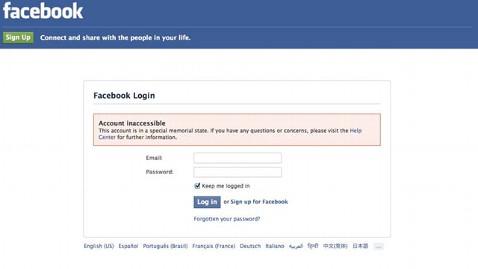
Rusty Foster discovered he was dead last week, at least according to Facebook. He had been locked out of his account, which had been turned into a “memorial page,” because someone had reported the Maine man as deceased to the social media site.
He tweeted Thursday, “Facebook thinks I’m dead. I’m tempted to just let it,” then “Did you know that you can report any of your Facebook friends dead & Facebook will lock them out of their account with no evidence needed?”
As one of Foster’s friends discovered, it doesn’t take much to convince Facebook that somebody is dead. By simply going to the “Memorialization Request” page and filling out a form, including a link to an obituary, anybody can take someone else off Facebook.
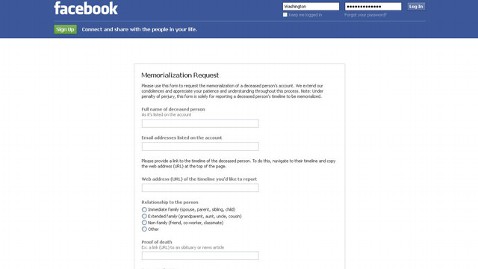
ht facebook memorialization page jt 130105 wblog Facebook Dead: How Anybody Can Kill Their Friends
                                                                                                               (Image Credit: Facebook)
The obituary needs to have the same name (or at least a close name), but doesn’t need to match any other details on the profile. The obituary Foster’s friend used to prove Foster’s death was for a man who was born in 1924 and died in 2011 in a different state than the one Foster lists on Facebook as his home state.
Foster, 36, said he never got any notification his account was going to be locked, and only discovered it when he attempted to log in. He filled out a form to report the error, and received a response that began with “We are very sorry to hear about your loss.”
More than a full day later, Foster’s account still hadn’t been unlocked. Buzzfeed, tipped off by Foster, posted an article in which one editor “killed” another editor, John Herrman, on Facebook. According to the article, about an hour after Herrman reported the error to Facebook, his profile was reactivated. About an hour after that, 27 hours after Foster first reported his erroneous death, he was “resurrected” by Facebook and allowed back into his account.
Foster does not know the total amount of time he was “Facebook dead.” He told ABC that nothing was different with his account when he logged back in, only that some of his friends had a little fun with his status.
“The only thing that happened was some of my friends posted little mock-eulogies for me, because word got around that I was locked out, due to a temporary case of death,” Foster wrote in an email with the subject line, “Rusty, the Facebook zombie.”
When pages are memorialized, they are removed from sidebars, timelines and friend suggestions and searches. This is likely to prevent people from seeing their friends who have died pop up on their newsfeed, and to prevent people from hacking into the accounts of dead people.
Foster said he understands the position Facebook is in when it comes to the death of one of its users, but believes there are better options for the social media site.
“There ought to be an email sent to the account’s email address informing it that the account has been reported dead and providing a link or something to dispute the report before any action is taken,” Foster wrote.
Foster said the most frustrating part was not being able to get into his account to “click the ‘I’m not dead’ button that should also be there.”
This has apparently been the same “memorialization” process since at least 2009, when another user took to his personal blog to write about his experience of being “Facebook dead.” In his case, the obituary his friend used to have him declared dead wasn’t even close to his real name. Instead, the man who performed the funeral services had a similar name.
In a statement to ABC News, Facebook said the system is in place in order to respect the privacy of the deceased.
“We have designed the memorialization process to be effective for grieving families and friends, while still providing precautions to protect against either erroneous or malicious efforts to memorialize the account of someone who is not deceased,” the statement reads. “We also provide an appeals process for the rare instances in which  accounts  are mistakenly reported or inadvertently memorialized.”
reprinted from: abcnews

Zynga: Off for eleven online games


Zynga: Off for eleven online games


(Mk) - Not at all good many gamers find the messages that were recently made by Zynga. The giant of the online games on social networking sites underlined in 2013, a series of popular games. This reported the technology blog TechCrunch.
Same eleven tracks are affected: PetVille, Mafia Wars 2, FishVille, Vampire Wars, Treasure Isle and Montopia were already off, Mafia Wars Shakedown, Forestville, Mojitomo and Word Scramble Challenge have been removed from the App Stores. To Indiana Jones Adventure World does not accept new players and more on January14th disappear from the network.
The reasons for the decision: waned The interest of users, the Zynga stock plunged in the summer in the basement, and the company reported billions in losses. The line picked up the red pencil. For prescribed austerity program include not only the streamlining of the games also offer redundancies. 150 employees lost their jobs already, the offices in Japan were closed.
The gamers are however shocked. Some pet owners in Petville complain loudly techcrunch.com the loss of their beloved pets, others destroying their virtual worlds. About Facebook, Zynga.com, iOS, Android, Myspace and other social networks Zynga offers but still at around 30 games, including Castle, Farmville 2, Mafia Wars or horn.

reposted from

Friday, October 26, 2012

Mafia Wars players - solving crosswords


Prepare yourselves, mobsters ... you'll have to prove yourselves in the days to come!

Mafia Wars players - solving crosswords
This was posted about 3 hours ago on Mafia Wars Fun Page

Mobsters,

Solve this crossword and win great rewards!

We'll be giving out one clue per day. Post your answer as a comment on this thread. The first person to give the correct answer will receive a reward. 

Clue for Day 1 is provided in this image. The winner for each clue will be announced daily.

Note: Winners will receive their reward after the entire crossword puzzle has been solved.

Get your thinking caps on!

-The Mafia Wars Team

Monday, October 15, 2012

ZYNGA IS KILLING SLOT MACHINE - Good or bad move?


ZYNGA IS KILLING SLOT MACHINE!!!
Good or bad move?
Zynga knows, ....maybe!

"Q: Why is the Slot Machine feature being shut down?
A:  We are working on bringing in more exciting and rewarding features in the game. The Slot Machine feature is being taken down temporarily as we continuously improve the game and make way for new and exciting features."

So it is what? Shutdown or being taken down temporarily? And what the hell  should I do with GRAND PRIZE 146/96 - I have no use of it.

Well, we are used to GOOD Zynga moves lately that this one should not be doubtful, well.........kind of.

rest of "Lucky Stash (Slot Machine) Shutdown Event - FAQ" post you can read on Mafia Wars by Zynga blog.

Friday, September 7, 2012

FREE Defense Point


Get extra protection on your side with a FREE defense point!
Click "LIKE" and "SHARE" if you want more FREE point ! 
http://tinyurl.com/bwqysh6 ;-- Claim your FREE defense point!

Adobe Flash 11 Install Guide!

NOTE: This is related to all, in our case Zynga games, not only FarmVille2.

Hey Farmers!

FarmVille 2 uses the latest technology from Adobe Flash to give you a great game experience in your web browser! In order to play FarmVille 2, your computer needs to have Adobe Flash Player 11 (or higher) installed.

If you have upgraded Flash recently, you may already be set and ready to play FarmVille 2. This guide will help you find out what version of Flash you have installed, and help you install or upgrade it if you need to!


How do I know what version of Flash I have?

If you aren’t sure what version of Flash you have on your computer, it’s easy to find out! Just click the link below and you will be taken to the Adobe Flash Player website, and told what version you have:

http://helpx.adobe.com/flash-player/...sh-player.html

This page will tell you many things about Flash on your computer. Two matter most in order to play FarmVille 2; Checking to see if Flash is installed on your computer, and learning what version you have installed.


No matter what Internet browser you are using, you should see something similar to the image above. The first section tells you if Flash is installed. If it is, you will see text and a red ball moving back and forth. If it’s not, you will see information telling you so and can move on to the next section of this guide to learn how to install Adobe Flash Player.

If Flash is installed, you can find out which version by looking further down the page at the second section. There is a small box with a few lines of information in it. What you are looking for is a line that looks like this:

“Your Flash Player Version: 11.4.402.265”

As long as the version starts with ’11’ you are set and ready to play FarmVille 2! If it’s not, please go to the next section and learn how to upgrade to Flash 11 in multiple Internet browsers.


Need to Install or Upgrade? Here is How, Based on Browser.

Installing or upgrading Flash is very similar for most Internet Browsers. You will need to download the program, and then run it for the install or upgrade to happen. Because each Internet browser handles downloading programs differently, we have a few examples to help you understand what to expect.

You do not have to install Adobe Flash in every Internet browser to have it work on your computer. If you install it on one browser, it will work for all of them. The only exception to this is the Google Chrome browser (see notes on Google Chrome below to learn more).

To install or upgrade, look for the Internet browser you are currently using in this guide. 

Google Chrome

If you use Google Chrome there is good news, Chrome updates Flash automatically, so you don’t need to install it separately! 
NOTE: If the version of Flash for Google Chrome is not up to Flash 11 (or higher) on your computer, you may need to install Flash 11 via one of the other Internet browsers.


Installing or Upgrading Flash Player for Firefox


If you need to install or upgrade Adobe Flash Player for Firefox, this guide will help! Just follow these step by step instructions to download and install the latest version of the Adobe Flash Player.

STEP ONE: Download the Adobe Flash Player Installer

Click this link to go to the Adobe website: http://get.adobe.com/flashplayer/

Click the ‘Download Now’ button


STEP TWO: Save the Flash Installer

After clicking ‘Download Now’ Firefox will ask you if you want to save the file to your computer or not. Click ‘Save File’ to save it to your computer and proceed with the installation.


STEP THREE: Open the Completed Download

The installer for Adobe Flash Player will now be downloaded to your computer. When the download is complete, double click on the file in your ‘Downloads’ window to open it and start the installation process.


STEP FOUR: Run the Installation File

After double clicking the installer file in the ‘Downloads’ window, a new window will open and ask you to confirm that you want to run the file and install the Adobe Flash Player. Click on the ‘Run’ button in this window to proceed with the installation.


STEP FIVE: (Windows Only) Grant Permission to Install

Many versions of Windows will have an additional step where Windows ‘User Account Control’ will ask if you would like to allow the Adobe Flash Player Installer to go ahead with the installation. Click the ‘Yes’ button on this window and the install will begin!


NOTE: If you do not see this window, it’s OK. Just move on to the next step in this guide!


STEP SIX: Preparing for the Install

The Adobe Flash Installer now has all the permissions that it needs to continue with the installation. The next thing you will see is the Adobe Flash Player Installer. This is a special installation window from Adobe that will tell you what’s happening through the course of the installation.


The first thing that will happen is the installer will get itself ready to perform the actual install. You won’t have to do anything at this step, other than give the installer time to get everything it needs to get ready.

STEP SEVEN: Select Update Preferences

After the installer is ready to go, you will be asked to select your Flash Player Preferences and see the window below:


On this step you can tell Adobe how you want to keep the Flash Player updated. You can choose from the following options:


  • Allow Adobe to install updates
  • Notify me to install updates
  • Never check for updates


If you select the first choice, Adobe will detect future updates and install them automatically for you. If you select the second choice, Adobe will tell you when there are new Flash Player updates so you can install them when you are ready. If you select the third choice, Adobe won’t check for new updates at all.

Make the selection that works best for your preferences and click the ‘Next’ button near the lower right corner of this window.

STEP EIGHT: Downloading Files & Installing Adobe Flash Player

The Adobe Flash Player Installer will now download any files necessary for the install and install Flash 11 on your computer. Once everything is all set you will see a window telling you its complete! 


https://userimages.static.zgncdn.com/farm2/images/008 Install Complete.png


Once you see this window, you can click the ‘Finish’ button near the lower right corner of the window to exit the installer.

STEP NINE: Confirming the Flash Player 11 Installation

After everything is complete and ready, your Internet browser will open to an Adobe page and confirm that it was a success.


https://userimages.static.zgncdn.com/farm2/images/009 Installation Confirmation.png


Once you see this window, you are ready to go! You can close the Internet browser for Adobe Flash Player and load FarmVille 2 and begin playing!

[Insert Play Now Link]


Installing or Upgrading Flash Player for Internet Explorer


If you need to install or upgrade Adobe Flash Player for Internet Explorer, this guide will help! Just follow these step by step instructions to download and install the latest version of the Adobe Flash Player.

STEP ONE: Download the Adobe Flash Player Installer

Click this link to go to the Adobe website: http://get.adobe.com/flashplayer/

Click the ‘Download Now’ button


STEP TWO: Run the Flash Installer

After clicking ‘Download Now’ Internet Explorer will ask you if you want to run or save the file to your computer or not. Click ‘Run’ to proceed with the installation.


STEP THREE: (Windows Only) Grant Permission to Install

Many versions of Windows will have an additional step where Windows ‘User Account Control’ will ask if you would like to allow the Adobe Flash Player Installer to go ahead with the installation. Click the ‘Yes’ button on this window and the install will begin!


NOTE: If you do not see this window, it’s OK. Just move on to the next step in this guide!


STEP Four: Preparing for the Install

The Adobe Flash Installer now has all the permissions that it needs to continue with the installation. The next thing you will see is the Adobe Flash Player Installer. This is a special installation window from Adobe that will tell you what’s happening through the course of the installation.


The first thing that will happen is the installer will get itself ready to perform the actual install. You won’t have to do anything at this step, other than give the installer time to get everything it needs to get ready.

STEP Five: Select Update Preferences

After the installer is ready to go, you will be asked to select your Flash Player Preferences and see the window below:


On this step you can tell Adobe how you want to keep the Flash Player updated. You can choose from the following options:


  • Allow Adobe to install updates
  • Notify me to install updates
  • Never check for updates


If you select the first choice, Adobe will detect future updates and install them automatically for you. If you select the second choice, Adobe will tell you when there are new Flash Player updates so you can install them when you are ready. If you select the third choice, Adobe won’t check for new updates at all.

Make the selection that works best for your preferences and click the ‘Next’ button near the lower right corner of this window.

STEP Six: Downloading Files & Installing Adobe Flash Player

The Adobe Flash Player Installer will now download any files necessary for the install and install Flash 11 on your computer. Once everything is all set you will see a window telling you its complete! 


Once you see this window, you can click the ‘Finish’ button near the lower right corner of the window to exit the installer.

STEP Seven: Confirming the Flash Player 11 Installation

After everything is complete and ready, your Internet browser will open to an Adobe page and confirm that it was a success. 


Once you see this window, you are ready to go! You can close the Internet browser for Adobe Flash Player and load FarmVille 2 and begin playing!

Thursday, August 23, 2012

Facebook has big issue-s

Lot of troubles last days for all, well for most Facebook users, Facebook Pages and Groups: 

- missing posts, comments, pictures, notifications....


- posts, comments, pictures, notifications...disappear, never shown, shown and disappear, notifications shown just one or two, pictures shown on timelines not added in albums, comments very ghostly - see you, see you not. 
Posts are acting in comments style - very ghostly. Font size in comments, oooo they are very interesting: from smallest to normal, depends on who left comment.

So Facebook and their users are in trouble, big trouble, but Facebook (no matter is trying to fix that mess) is not speaking to his users. That is not good.

Would not be better to warn users and put in comment: we are aware of those problems and we are working on solving?!?


On the other hand, this is how looks like Welcome to Facebook - Login option day ago, as usual, almost.


This is how looks Welcome to Facebook - Login option today. Very interesting!


But, do not worry, you need just wait a bit and this advertisement disappear.